Optimize SPA for SEO with Dynamic Rendering and Prerendering

Problem with SPA and SEO
Recently I worked on optimizing a legacy Single Page Application (SPA) for SEO. The application was built using React ( Create React App ) and hosted on AWS ( Cloudfront and S3 ).
We all know SPAs rely heavily on JavaScript to render content on the client side. While this architecture provides a smooth user experience, it poses challenges for search engine bots that may struggle to execute JavaScript and index the content effectively. As a result, SPAs can suffer from poor visibility in search engine results, impacting organic traffic and discoverability. Additionally, if our API responses are slow, it can lead to incomplete or delayed content rendering.
Solutions
Initially, I thought to migrate our application to SSR ( Server Side Rendering ) solutions like Next.jsor other frameworks . However, since it would take lot of effort to migrate to those frameworks and the entire project would have impacted, we had to stick with the existing architecture and looked for a quick and simple workaround. This led me to explore alternative solutions like Dynamic Rendering and Prerendering.
Dynamic Rendering
Dynamic Rendering involves serving different versions of a web page to users and search engine bots. When a bot requests a page, the server detects the user-agent and serves a bot optimized version of the page, while regular users receive the standard SPA version.
Prerendering
Prerendering is another technique where static HTML snapshots of web pages are generated in advance. By generating static versions of dynamic pages, we can ensure that search engines receive fully rendered HTML.Tools like Prerender.io can be used to automate this process. However, we chose a custom setup due to the volume of pages and frequent (daily) updates.
Let's Start
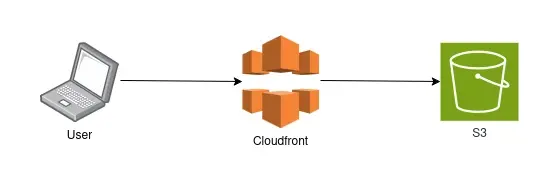 Simple SPA App
Prerendering Setup
- Set up prerendering: We create a Node.js script that used Puppeteer to set up a headless browser that can render our pages and capture the fully rendered HTML and stored it in an S3 bucket.JavaScript
import puppeteer from 'puppeteer'; import { S3Client, PutObjectCommand } from '@aws-sdk/client-s3'; const s3 = new S3Client({ region: process.env.AWS_REGION || 'us-east-1', }); const BUCKET_NAME = process.env.S3_BUCKET; const TARGET_URLS = []; // URL of the SPA to be prerendered if (!BUCKET_NAME || !TARGET_URLS.length) { throw new Error('Missing S3_BUCKET or TARGET_URLS'); } async function renderPage(url) { const browser = await puppeteer.launch({ headless: 'new', args: ['--no-sandbox', '--disable-setuid-sandbox'], }); try { const page = await browser.newPage(); await page.goto(url, { waitUntil: 'networkidle0', timeout: 60000, }); const html = await page.evaluate(() => { return document.documentElement.outerHTML; }); return html; } finally { await browser.close(); } } async function uploadToS3(html, key) { const command = new PutObjectCommand({ Bucket: BUCKET_NAME, Key: key, Body: html, ContentType: 'text/html; charset=utf-8', }); await s3.send(command); } (async () => { await Promise.all(TARGET_URLS.map(async (url) => { console.log(`Rendering ${url}...`); const html = await renderPage(url); const s3Key = `renders/${url}.html`; console.log(`Uploading to s3://${BUCKET_NAME}/${s3Key}...`); return uploadToS3(html, s3Key); })); console.log('✅ Done'); })(); - Schedule prerendering: This ensured that our prerendered pages were always up-to-date with the latest content. The frequency of this job can be adjusted based on how often your content changes. In our case, we scheduled it to run daily. We had our own server where we scheduled a periodic job (using cron) to run the above node js script daily.
Dynamic Rendering Setup
- Configure WAF: We added the WAF rules detect search engine bot traffic and add a custom header to bot requests.
- Create a Lambda function: We create a Lambda@Edge function, so that it conditionally serves pre-rendered HTML to search engine bots based on the header added by WAF.JavaScript
exports.handler = (event, context, callback) => { const SEO_ORIGIN = 'example.com'; const CRAWLER_HEADER = 'x-amzn-waf-searchbot'; const {request} = event.Records[0].cf; if (request.headers[CRAWLER_HEADER]){ request.origin = { custom: { domainName: SEO_ORIGIN, port: 80, protocol: 'http', path: '', sslProtocols: ['TLSv1.2'], readTimeout: 5, keepaliveTimeout: 60, customHeaders: {} } }; request.headers.host = [{ key: 'host', value: SEO_ORIGIN}]; } callback(null, request); };
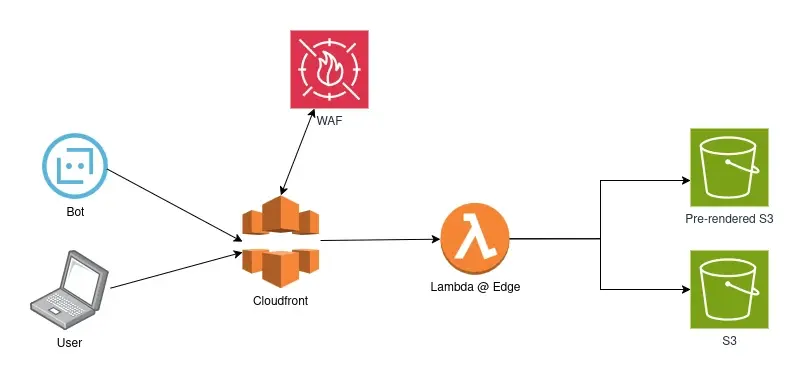 SEO Optimized SPA App
That's it. Give some time to index your pages.
Important:
- Make sure client-side scripts do not execute again for bot requests, to avoid re-hydration issues while indexing prerendered HTML.
- Make sure your lambda@edge function handles your asset files properly, such as CSS and images.
- If your site relies heavily on JavaScript for responsiveness, you may need separate versions for mobile and desktop bots. To avoid this, prefer CSS media queries for responsiveness wherever possible.
References Links
- https://aws.amazon.com/blogs/networking-and-content-delivery/how-to-optimize-content-for-search-engines-with-aws-waf-bot-control-and-amazon-cloudfront/
- https://developers.google.com/search/docs/crawling-indexing/javascript/dynamic-rendering
- https://prerender.io/blog/how-to-be-successful-with-dynamic-rendering-and-seo/
- https://developers.google.com/search/docs/crawling-indexing/googlebot